ChatGPT continuation extension
Install the optional Chromium continuation extension, save exact ChatGPT chats, understand its status and privacy, and troubleshoot safe delivery.
Guides follow the current project source. Check the release notes for your installed version.
What the companion does
RepoTunnel Continuation delivers a RepoTunnel-authorized continuation checkpoint to an exact ChatGPT conversation you explicitly save. It helps the supported continuation workflow resume in that chat after a safely completed turn.
It is optional. The desktop MCP gateway, project permissions and ordinary AI work do not require the extension. Keep factual Project Memory and Resume v2 state current even when you use the companion.
Get the source folder
The extension lives at extensions/chatgpt-continuation in the RepoTunnel repository’s main branch. Obtain that source folder before using Load unpacked; select the extension folder containing manifest.json rather than the repository root.
The already-published v0.4.1 desktop release does not list a separate extension asset. This guide does not imply a browser-store listing or an extension installer bundled into that desktop package.
Install in a compatible Chromium browser
The project documents Chrome/Chromium 102 or newer, or a compatible Chromium-based browser. RepoTunnel must be running locally.
- Open the browser’s extensions page, such as chrome://extensions in Chrome/Chromium or edge://extensions in Edge.
- Enable Developer mode.
- Choose Load unpacked and select extensions/chatgpt-continuation.
- Open your exact https://chatgpt.com/c/... conversation.
- Open RepoTunnel Continuation from the browser toolbar.
- Choose Add current ChatGPT chat.
Keep the unpacked installation in a stable folder after pairing. Do not delete RepoTunnel application data to change an extension installation.
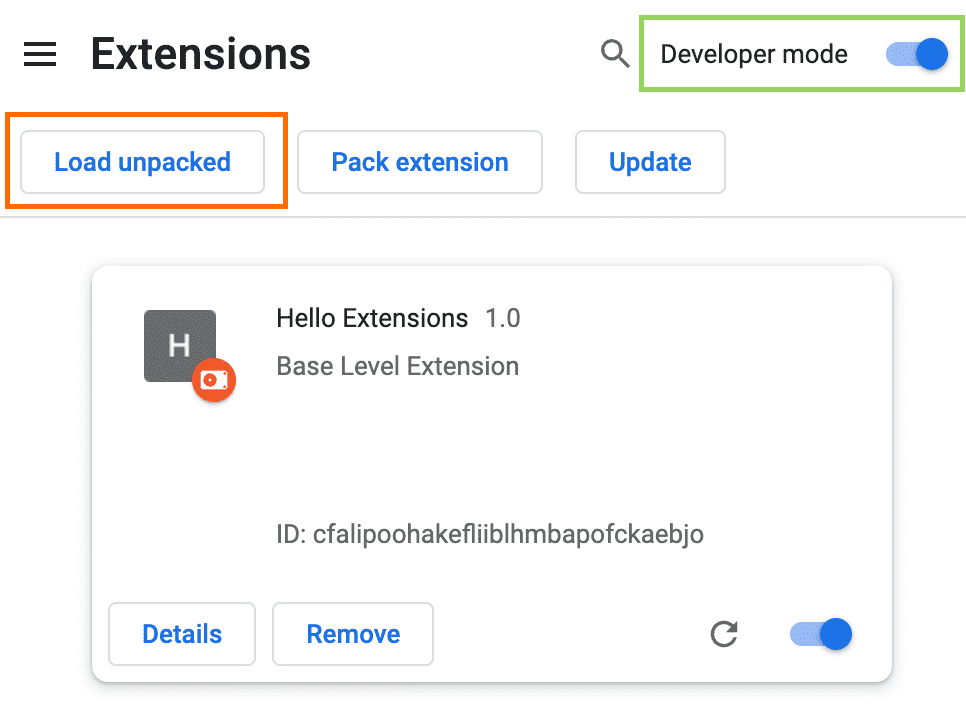
Google’s official example highlights Developer mode and Load unpacked. Select RepoTunnel’s extensions/chatgpt-continuation folder for your installation; the sample extension pictured is Google’s tutorial example. © Google, CC BY 4.0.
Save the exact conversations you want
You can save up to five exact conversations. A general ChatGPT home URL is not a target, and the companion does not guess another conversation when a saved one is unavailable.
Keep the intended saved chat open. Duplicate tabs for the same conversation are refused by the documented continuation flow; close the unnecessary duplicate and inspect status before retrying.
Read the extension status
- Not set: no ChatGPT conversation is saved.
- Waiting: a saved conversation has not recently registered with the local RepoTunnel bridge.
- Connected: the saved conversation has recently registered with RepoTunnel.
Connected confirms recent registration. It does not mean there is a checkpoint to send or that a delivery has completed.
Understand safe delivery
The extension waits for an idle completed assistant response and an empty composer. It protects recent human typing, prepares the checkpoint, obtains authorization from RepoTunnel, attempts one send and seeks a positive acknowledgement.
If a crash or transport failure makes the post-send outcome uncertain, the message is not automatically replayed. Inspect the actual chat and continuation state before deciding how to recover.
Know the data and permissions
The extension stores exact saved conversation URLs, tab titles and bounded connection/delivery status in extension-local storage, with temporary bridge-health state in session storage.
Its declared hosts are chatgpt.com and the dedicated local bridge at 127.0.0.1:43185. It requests activeTab, alarms, scripting and storage for the saved-chat and heartbeat workflow. The documented companion has no analytics, advertising, telemetry or third-party tracking.
Troubleshoot a waiting checkpoint
Check that RepoTunnel is running, the intended chat is saved and open at its exact conversation URL, the turn is idle, and the composer is empty. Recent typing, a duplicate tab, an active response or unavailable bridge can keep delivery waiting.
RepoTunnel pins the first valid extension origin that registers. Preserve a working paired installation until you intentionally migrate it; replacing folders or clearing app data is not a routine waiting-state fix.