Phone Access
Connect a selected Android device with explicit capability controls.
Guides follow the current project source. Check the release notes for your installed version.
Access modes
- Off
- Limited with selected capabilities
- Full
- Pause AI as a separate emergency control
Transport
Wireless Debugging is preferred. Authorized USB can act as fallback for the same selected device.
Capabilities
- Persistent live screen
- Guarded tap/swipe/key/text
- Apps and APKs
- Files
- Settings
- Shell/log/network diagnostics
- Semantic helper actions and bounded transactions
Prepare the selected Android device
Phone Access works only with a phone selected locally by the human. Wireless Debugging is preferred when authorized, with USB fallback for the same device when supported. The AI receives an opaque target device identity, not a raw adb serial.
The bundled Phone Helper provides bounded semantic accessibility actions, but the user must grant Android Accessibility permission on the phone itself. RepoTunnel does not silently turn it on.
Pair and confirm the device locally
- On the Android phone, enable Developer options. For supported Android 11+ Wi-Fi pairing, put the computer and phone on the same network and open Wireless debugging.
- Use RepoTunnel’s local Phone pairing controls with the phone’s current pairing details. Pairing details belong in that local flow rather than an AI chat.
- Select the intended paired phone in RepoTunnel, choose Limited or Full locally and grant only the capabilities you need.
- If the Phone Helper requests Android Accessibility permission, grant it on the phone yourself. Verify the live screen belongs to the selected device before asking the AI to act.
Menu names vary by phone vendor. USB fallback still requires the phone’s local debugging authorization. Pairing and permission changes remain under your control.
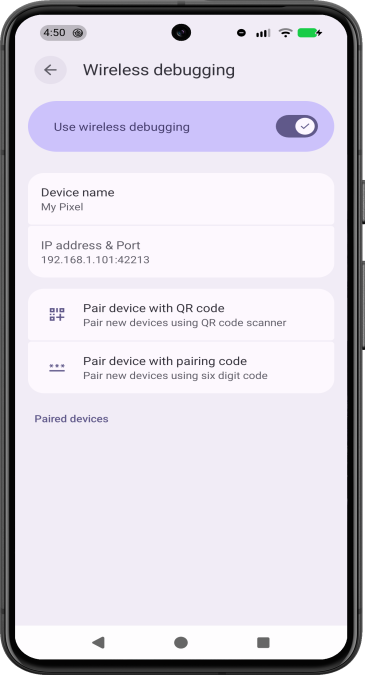
Google’s official Android example shows Wireless debugging and Pair device with pairing code. Device menus can differ by vendor. © Google, CC BY 4.0.
Use the least access needed
Off blocks AI Phone access; Limited permits individually enabled capabilities; Full exposes the supported set subject to the phone’s own OS and app policy. Pause AI is an independent emergency boundary.
MCP cannot pair/select a new device, raise capability grants or unpause Phone Access. These controls remain local to the user.
- View the live screen when permitted
- Control input with granted capability
- Use bounded app/file/settings tools only when enabled
- Re-check the foreground application before sensitive actions
Understand OS denial
An Android vendor, profile policy or application may refuse an operation even when Phone Access says Full. That is an OS-level result, not proof that RepoTunnel failed. Inspect the reported error before trying an alternative.